
The Abacus 21 System allows the User to define multiple Addresses for Prospects, Members, Guests (that is Client Type Other), Vendors, etc. -- and Address Types are one of the methods used to differentiate Addresses.
The other methods used to differentiate Addresses are:
Dates of Sensitivity within an Address Type.
Address Mappers -- that 'select' an Address Type (perhaps conditioned by Dates of Sensitivity) that is to be used for a particular mailing distribution function (such as Billings, Newsletters, Promotions, Alerts, etc.)
A Client-Member-Prospect-Guest-Vendor (both Primaries and their respective Individuals) can have multiple Addresses -- and these Addresses can be categorized by Address Types.
It is furthermore possible to have multiple Addresses all of the same Address Type -- and these are differentiated by Dates of validity, for example in a Member context:
Two Home Addresses: one for Summer (May 1st thru September 30th) vs. one for Winter October 1st thru April 30th.
An 'old' (previous) Home Address: that was valid from February 14, 1973 thru October 22, 1998.
It is also possible to establish 'Address Mappers' -- which can be used to 'route' certain types of mailings to certain Address Types (for each respective Client-Member):
The Member has requested that his Billing Mailings go to his Business Address.
The Member has requested that his Club Social Communications go to his Home Address.
The screen below illustrates the setup of Address Types:
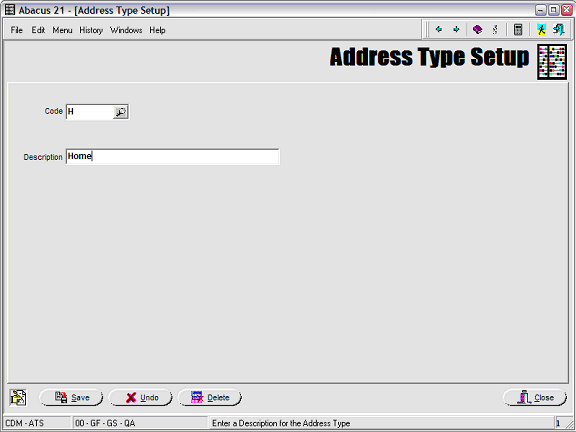
Address Type Code (6-Character) - This is used to differentiate Types of Addresses -- for example Home vs. Business vs. Vacation vs. Shipping etc.
Address Type Description (30-Characters) - The Description of the Address Type.
Hints regarding Addresses & Phone-Numbers & Email-Addresses -
The following considerations may be helpful do you when trying to decide how to configure your Addresses, Phone-No's, and Email-Addresses.
Abacus 21 has made a provision to incorporate the usage of the single Cell-Phone and single Email-Address in the Membership table -- the thought here being that a person usually has a single Cell-Phone and a single Email-Address... and that it is independent of Addresses.
But - if you have multiple Email-Addresses or Phones that are used for different purposes, then this will not suffice. In those cases, you need to depend on the Address(es) table.
Using the Address table has the benefit of having multiple records to keep multiple Addresses, Phone-Numbers and Email-Addresses.
The Address records can be Type-cast using the Address Types and then linked to special purposes using Address Mappers.
Now... the Phone-Numbers and Email-Addresses do not necessarily need to be linked to the Street Addresses. For example, you can create Address-Types for:
Primary Cell Phone
Business Cell Phone
Private Cell phone
Primary Email address
Business Email Address
Private Email Address
Home Street Address
Business Street Address
Summer Street Address
And basically an unlimited number of other Address Types
So... the Email Address-Type records would contain no Street Address or Cell-Phone - just an Email-Address.
Now the trick is that you do NOT have to use all of these Address-Types for all Members -- so you should NOT have to set up the same Email-Addresses and Cell-Phone numbers or even Street Addresses in multiple places. You only create multiple records where the Member actually has multiple addresses or phone numbers.
And then you create Address Mappers for as many different purposes as you like:
Billing mailing address
Social Email Address
Social Texts
Emergency Texts
Social Email Address
Dining Email Address
Billing Email Address
Whatever else you may think of...
Then you link the Address records to the purpose Address-Mappers... and here you might want to set up all of them for all Members (just for consistency's sake for the Users).
For example, a very simple situation:
A person has a single Cell Phone, a single Email address, and a single Street address.
There are still multiple ways to skin-the-cat here... more based upon operational concerns with the Users.. and what would be least confusing.
In this situation, you could create three Address records for the Person:
Primary Street Address
Primary Cell Phone Address
Primary Email Address
Then all of the Email related Mappers would point to the Primary Email Address Type - so for all email purposes you would get the same Email Address record.
Similarly all Cell Phone related Mappers would point to the Primary Cell Phone Address Type and all Street Address related Mappers would point to the Primary Street Address.
So in this example there would only be one place to maintain the Street Address, one place to maintain the Cell Phone and one place to maintain the Email Address.
Therefore, in using this philosophy, you would NEVER use the Cell Phone or the Email Address in the Membership Record.
(The exception is the Statement email address. This is simply placed in the folio - but we could discuss linking to an Address Mapper in the future.)
In this simple situation, you could go one step simpler:
You could create another Address-Type of "Consolidated Address". This would be used for the very simple Members and would contain the Email Address, Street Address, and the Cell Phone. Then ALL Mappers would be pointing to this one Address-Type.
And in going to Client Maintenance, the User would see a single Address record of this 'Consolidated' type and know that everything is in that record.
And still one simpler step which you may or may not want to do is contemplate the usefulness of that fact that the Address selections drop back to the Display Address if no Mapper is defined for a particular purpose on the Member. So you would not have to even define any Address-Mapper at all for this simple person.
This might take care of the majority of your Members... to be determined by your situation.
If at some point in the future the simple Member may decide that they wanted separate Addresses or Cell-Phones or Email-Addresses for other purposes... then at that point you would need to create additional Address records for those additional cell phone numbers or addresses or emails. But... you ONLY need to create a many as actually exist... And then create or redirect the their Mappers to the appropriate Address-Types.
So... again in the first simple situation, when the Member says that they have another Cell-Phone that they want used for Social Texts, you might create a new Address record containing only a cell phone and give it an Address-Type of "Private"... or whatever seems appropriate. Then adjust the single Address-Mapper for Social Texts to go to his "Private" Address-Type.
In other words, the whole concept of Address-Types and -Address-Mappers is to AVOID having to do double or triple maintenance of Addresses or Emails or Phone-Numbers.
It all comes down to building the correct Address-Types and Address-Mappers to suit your needs.
