
The following instructions are pertinent to moving System 441 from one Server to another.
Overview -
Installation or Re-Installation of Interbase -
On the new Server...
Install Interbase – you will need the Serial Number and Authorization Key so you can re-register with Borland
Install any Interbase Service Packs available – please contact Support
Register the server using IBConsole (Start | Programs | Interbase)

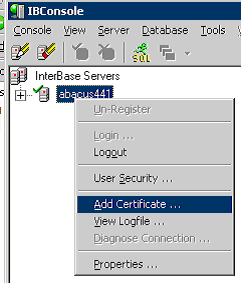
Install additional Interbase User and/or Processor Licenses – you will need the Certificate ID’s and Keys.
Right-click the Server and add Certificates.


Run the System 441 Server Installation – please contact Support for the correct version.
Migrate files from the old server to the new server (Abacus 21 folder, UDF files) -
Program Files | Borland | Interbase | UDF – copy only A21 UDF’s.
If the System is completely down…
Rename the Database and do a Backup. If Comet is in use you will need to do the same with the Transfer Database.
Copy everything in the Abacus21 folder to the new Server’s Abacus21 folder.
If the System is in use and will be turned over last minute…
Copy everything in the Abacus21 folder EXCEPT the A21data folder.
When ready to down the Database, rename the Database and make a Backup – If Comet is in use you will need to do the same with the Transfer Database.
Then copy the A21data folder to the new Server.
Be sure to restore the Network Shares for the A21data and A21upgrade folders.
After migration is complete, have the Network Administrator check the security on the shares.
On the new Server:
Restore the System 441 Database and Transfer Database (if Comet is in use).
Reset the Upgrade path in the System 441 Database using Server Upgrade Utility – Expert Options
Reinstall any Network Services programs.
Run Install Helper on each Workstation to reconfigure the BDE and ODBC using the following method:
Start | Run | A21RunUtility –Install “default”
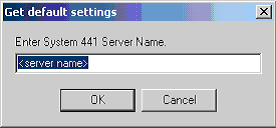
Type in New Server Name
Click OK and the Apply Profile
In System 441, change any settings that used Network paths to the old Server to use paths to the new Server. (i.e. Abacus21.ini, Credit Card Interface Setups)