For certain Abacus 21 applications, it is necessary to establish a relationship between a general Abacus User-ID (it's prevailing Password aside) Log-on and the user's Staff Code.
Staff Code's are associated with individual Employees -- and, when coupled with Application Sign-In Password (ID's) are particularly relevant to certain Applications --- such as Point-of-Sale (of any variety), Timekeeping, Reservations (of any variety), etc. -- for identifying a specific Employee (Staff person) and defining their respective 'privileges' with the specific application (for doing such things as Voids, Comps, Cancels, etc.)
Note that a Staff Person may be set up in general (as an Employee) or as an active Staff Person entitled to use one or more specific Applications.
A Staff Person can be assigned a unique 'Staff Password ID' (aka Staff ID) for each specific Application (such as F/B Point-of-Sale vs. Spa Reservations vs. Retail Point-of-Sale, etc.) Each specific Application Password has associated with it a Staff Type (which implies the 'privileges') and an Effective (or Override Date) for the Password ID.
In Staff-specific "End-End-User" applications such as Point-of-Sale it is natural for the Staff personnel to have to identify themselves within the Application(s) -- so that their respective identities and privileges are precisely known.
End-End-Users are general Staff (such as Food/Beverage Servers, Bartenders, Retail Clerks, etc.) who may have a general (Abacus System User ID -- such as POS) to sign onto the system in general (either manually or automatically on boot-up)... but who most likely have individually specific Staff ID to which to associate application privileges (such as privilege to Void, to Comp, to Cancel, to Move, etc.).
In other more general Applications (such as General Ledger or Accounts Payable or Inventory etc.), it may not be appropriate (nor practically convenient) to ask for a Staff (Password) ID each time when entering the application -- but the inherent ability to 'hook to' applicational privileges is also beneficial. It is in this context, that an (under the surface) link between a User-ID and a Staff Code becomes necessary.
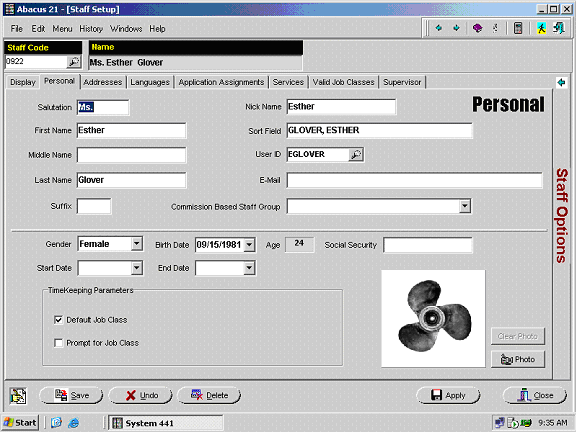
The following screen shows how (within Staff Setup, on the Personal Tab) a User ID is associated with the Staff Code.
In the example below, the Staff Code for Esther Glover (Code=0922) is 'linked' to User-ID EGLOVER: