
Workstation setup 'defines' the physical (or virtual, in the case of Citrix or Terminal Services) Workstation to the Abacus 21 Application System.
To set up a new Workstation or edit an existing Workstation's setups:
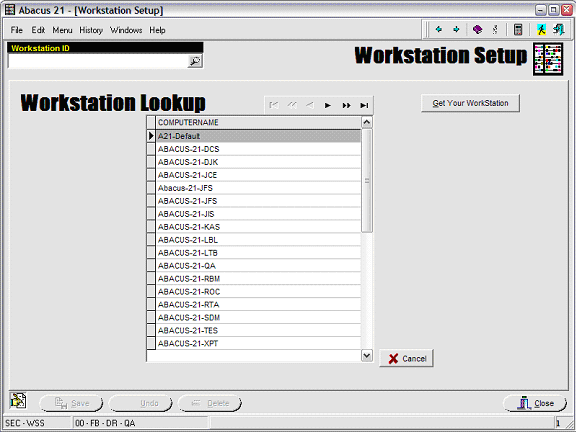
First use the search icon to display currently established Workstations.
Call up an existing Workstation (to display/edit its setups) -- or hit the 'Get Your WorkStation' button if determine 'your' Workstation Name.
Configure the Workstation Settings as appropriate.
For a normal strictly System 441 Workstation configuration, the Workstation Setup screen appears as below:

A more elaborate Workstation setup (and one that involves that allows the hybrid-mixture of Abacus 21's older Legacy (Comet) System with the newer System 441) might appear as:
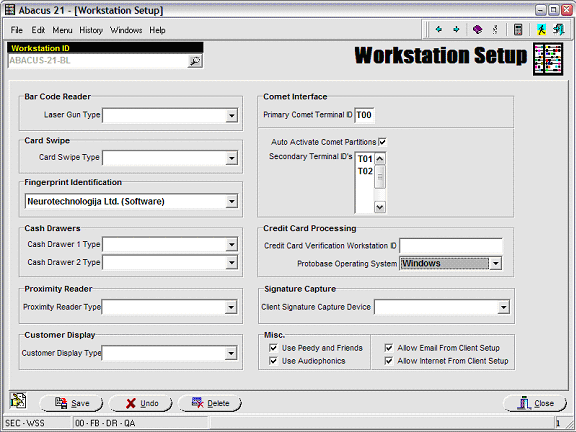
Bar Code Reader - reserved for future customized BarCode Reader control.
Card Swipe - reserved for future customized Card Swipe control.
Fingerprint Identification - used to reference the Fingerprint Registration/Recognition software that is to run on this particular Workstation.
The particular internal software used here will be defined by Abacus 21.
If filled in, at the time the Abacus system is started at the Workstation, the system will try to 'launch' the Fingerprint Registration-Recognition software in background.
This information will be provided by Abacus 21.
Cash Drawers - reserved for future customized Cash Drawer control.
Proximity Reader - used to reference the particular style of Proximity Reader (software protocol) used this Workstation.
This information will be provided by Abacus 21.
Customer Display - reserved for future customized Customer Display control.
Comet Interface - only necessary for those Installations that need the Legacy System applications running on this particular Workstation.
Primary Comet Terminal ID: the first Terminal Session ID
Auto Activate Comet Partitions: Check if System 441 launch at the Workstation should automatically start-up all the (configured) Comet Sessions.
Secondary Terminal ID's: specification of any other Comet Terminal Sessions to be associated with this Workstation.
This information will be provided by Abacus 21 -- and derived from the prevailing Comet System Configuration.
Credit Card Processing - used to configure the Credit Card software for this particular Workstation.
Credit Card Verification Workstation ID: the (central) Workstation Name that will run the Credit Card Authorization Comm Server associated with this Workstation.
Protobase Operating System:
This information will be provided by Abacus 21.
Signature Capture - used to declare the particular brand/protocol of Signature Capture Device (usually a Signature Pad) attached to this Workstation.
This information will be provided by Abacus 21.
Miscellaneous -
General System Related:
Use Peedy and Friends: Used to turn the Animated 'Alert' Characters 'On' and 'Off'.
Peedy - The 'bird' at User Sign-In (warns of incorrect Sign-In Passwords)
The Monkey - The 'monkey' used throughout the applications who 'warns' of missing or incorrect (required) field entries.
The Dragon - The 'dragon' used to notify Staff of application functions for which they do not have Staff Privileges.
Use Audiophonics: Used to turn the 'sounds' of the Animated Characters 'On' and 'Off'.
Client Prospect-Member-Other Related:
Allow Email from Client Setup: used to turn 'On' or 'Off' the Email hot-link on the main Client Maintenance Screen.
Allow Internet from Client Setup: used to turn 'On' or 'Off' the Website hyperlink on the main Client Maintenance Screen.