
The General Ledger System Configuration defines the General Ledger 'Controls' for the system -- as well as formatting the 'structure' of the Accounts themselves.

The above Prerequisite is for the Earnings Account Reference -- and cannot be entered until the G/L Configuration is completed (inclusive of Account Format) and the relevant Earnings Account is created in the G/L Masterfile.
The screen below shows typical settings for the 'Control' aspects of the General Ledger System:
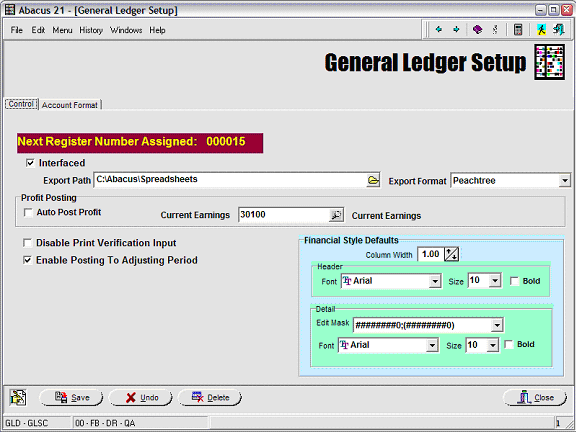
Next Register Number Assigned - This displays the next G/L Register Number to be assigned (by the System internally) to the next G/L Posting Register that is run.
For System integrity purposes, the Next Register Number Assigned cannot be changed by the User.
Interfaced - Check this box if you have purchased an Export of Abacus 21's Journal Entries to a 3rd-Party General Ledger.
This is a purchased Option. See G/L Interfaces on Abacus 21's Website.
Export Path: Enter or browse to the path where the Export file should be written.
Export Format: Select from a Dropdown list of Export File formats.
Contact Abacus 21 for a complete list of available formats.
Profit Posting - Optional
Auto-Post Profit: Check this box if you want the G/L Month-End process to automatically post Profit to a Capital Account 'Current Earnings' Account.
Current Earnings: Enter or search for the Capital Account to which you wish to have Current Earnings posted.
Disable Print Verification Input - Check this box if you wish to disable the requirement (upon Final Register Posting) to have to enter the Register's Print Verification ID 'Checksum'.
Print Verification Input forces the entry of the Register's (System-generated) Verification ID (which appears printed at the bottom of the Register printout).
Although Abacus 21 Registers are checked to make sure they are in Debit-Credit (and have other cross-references intact) prior to allowing posting, the intent of this safeguard is to insure that the Operator has 'looked at' the Register before deciding to actually post it as 'Final'.
Note: Preliminary Register Posting does not involve a Print Verification ID -- since it is not 'Final'.
Enable Posting to Adjustment Period - Check this box if you wish to enable the ability to make J/E adjusting postings to a dedicated Accounting Adjustment Period.
In order to do this it is necessary to set up an 'extra' (Adjustment) Accounting Period in addition to the normal fiscal Accounting Periods:
If the Company's normal Fiscal Year includes 12 Periods, the Adjustment Period is the 13th Period.
If the Company's normal Fiscal Year includes 13 (even 4-week) Periods, the Adjustment Period is the 14th Period.
Financial Style Sheet Default - Allows for the declaration of certain defaults associated with the Financial Report Writer's Financial Report Styles.
Column Width: Enter the default width of Columns (in inches) that the Financial Style Sheets will adopt.
Header Defaults:
Font: Enter the default font to be used in the Financial Style Sheets.
Size: Enter the default font size to be used in the Financial Style Sheets.
Bold: Check this is 'bold' is to be the default font style to be used in the Financial Style Sheets.
Detail (Line) Defaults:
Edit Mask: Select an edit mask for number formatting.
Font: Enter the default font to be used in the Financial Style Sheets.
Size: Enter the default font size to be used in the Financial Style Sheets.
Bold: Check this is 'bold' is to be the default font style to be used in the Financial Style Sheets.
The screen below shows how the structure of the Account Format is laid out:
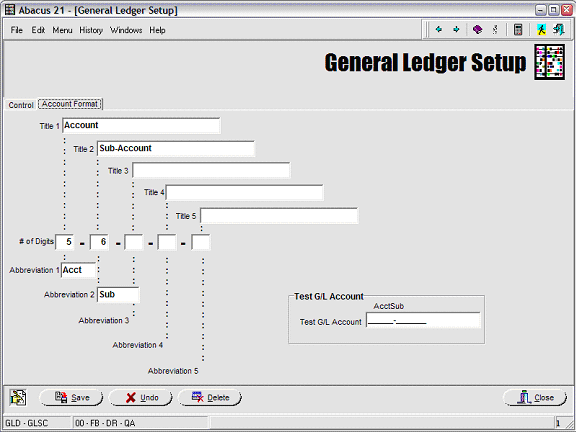
An Account (which is typically numeric, but which can also be alphanumeric -- particularly for Statistical Accounts) can be (optionally) divided into up to five (5) segments.
Note that the definition of an Account Format excludes its Organization Code -- which is a 'prefix' to the Account Number that implies is associated Organization (Department, Profit Center, Cost Center).
A hyphen '-' is the implied separator between Account Segments.
The above example utilizes two of the five possible breakout segments.
Title 1-5: The (long) Description of that Account Segment.
# of Digits: Enter the number of characters (digits and/or alpha) to be associated with each segment of the Account.
Abbreviation 1-5: Enter a (short) Description for the respective Account Segment.
This Abbreviation will be used in situations where there is not sufficient space to include the Long Description.
Test G/L Account - Enter an Account here to see how it will be segmented in accordance with the Account Format.