
This Menu Option activates Purchasing System -- and configures it to operate in a specific manner.
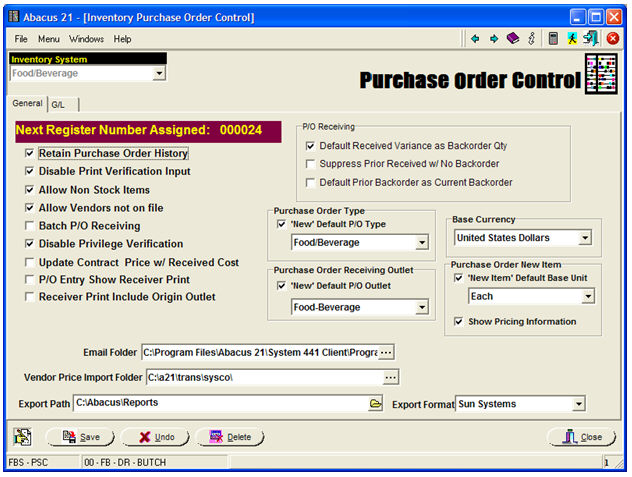
Everything within Purchasing (and Inventory and Point-of-Sale) is segregated by Inventory System -- so... select an Inventory System.
General Tab -
Next Register Number Assigned - This an internally-controlled P/O-Receiving Register Number that is automatically incremented by the System. It is for informational purposes.
Retain Purchase Order History - Check this box if you want the System to retain Purchase Order History files.
Disable Print Verification Input - Check this box if you want the System to by-pass the requirement to have the P/O "Printed" before it is further processed.
Allow Non-Stock Items - Check this box if you want the System to allow the entry of Non-Stock Items.
If 'allowed', Non-Stock Items are "recognized" when an Item-Code is entered that is 'Not-on-File'... and the User is then asked if they would like to create a Non-Stock Item.
Allow Vendors Not-On-File - Check this box if you want the System to allow creation of Purchase Orders to Vendors who are not previously created (on file).
If 'allowed', Not-on-File Vendors are "recognized" when an Vendor-Code is entered that is 'Not-on-File'... and the User is then asked if they would like to create a a P/O for a Vendor Not-on-File.
Batch P/O Receiving - Check this box if you want the System to force P/O Creation & Processing into "Batches"... each with its own respective Buyer (and Receiver).
Disable Privilege Verification - Check this box if you want the System to ignore the checking of various Staff-ID Privileges (for exercising particular functionalities) within Purchasing.
Update Contract Price with Received Cost - Check this box if you want the Receiving aspect of the Purchasing System to update the prevailing Purveyor-Vendor Contract Price with the Cost of the just-received Item.
P/O Entry Show Receiver Print - Check this box if you want the 'Receiver Print' (Receiving Document) button active in Purchase-Order Entry.
Receiver Print Include Origin Outlet - Check this box if you want the 'Receiver Printing' to include reference to the Originating Outlet.
P/O Receiving -
Default Received Variance as Backordered Quantity - Check this box if you want the System to automatically derive the Backordered Quantity as the shortfall of what was 'Received' versus what was 'Ordered'.
If this box was checked:
If 12 were Ordered and only 9 were Received, the Backordered Quantity would be automatically set to 3 (but could be overridden).
If this box was NOT checked:
If 12 were Ordered and only 9 were Received, the Backordered Quantity would be be 0 (but could be changed).
Notes:
In Food/Beverage Purchasing, it is common to leave this Un-Checked -- as the normal presumption is "Fill-or-Kill"... if I can't get it all "now", I take whatever is available... but won't "wait" for the rest.
In Retail, the reverse is often true -- Partial Shipments (Partial Receipts) are the norm.
Suppress Prior Received with No Backorder - Check this box if you want the System to suppress (on Orders that are multiply-received, Items that were previously-received -- but had their BackOrdered Quantities specified as "0".
This is protect against having Items on subsequent Receivings inadvertently "received" when that had been definitively-declared Not-BackOrderable (ie, Backorder Quantity = 0) on a previous Receiving.
Default Prior Backorder as Current Backorder - Check this box if you want the System to automatically assume that the prior Order's Receiving Backorder Quantity should be used as the amount to presume remaining on the subsequent Receiving.
Purchase Order Type -
'New' Default Order Type - Select the default P/O-Type to be assumed for new Purchase Orders (which can be overridden when actually creating a new P/O).
Purchase Order Receiving Outlet -
'New' Default Receiving Outlet - Select the default (Receiving) Outlet to be assumed for new Purchase Orders (which can be overridden when actually creating a new P/O).
Base Currency - Choose the default Currency to be assumed when creating a new Purchase Order (which can be overridden when actually creating a new P/O).
Purchase Order New Item -
'New' Default Base Unit - Select the default Unit that is to be assumed as the Base Unit when 'new' Items are created within Purchasing.
Show Pricing Information - Check this box if you would like the System to display the Pricing Information Screen upon creation of a 'new' Item.
Email Folder - Enter the Email Folder's path for the email "working file folder".
The ability to Email (or Fax) Purchase Orders is an Add-On Option. Contact Abacus 21 Sales.
Vendor Price Import Folder - Enter the path where Vendor Contract Prices (Purveyor Contracts) are to be loaded into.
The ability to accommodate Vendor-Purveyor Contracts is an Add-On Option. Contact Abacus 21 Sales.
The ability to accommodate EDI (Electronic Data Interchange) is an Add-On Option. Contact Abacus 21 Sales.
Export Path - Enter the path where the Abacus 21 P/O-Receving Systems "Export to 3rd-Party Accounts Payable Systems" is to be exported.
The ability to accommodate Exports to 3rd-Party A/P Systems is an Add-On Option. Contact Abacus 21 Sales.
Export Format - Select the pertinent 3rd-Party A/P System.
G/L (General Ledger) Tab -
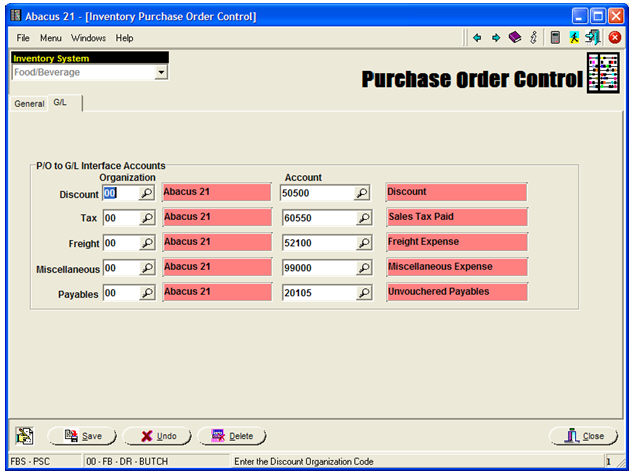
This is where all the non-Item related P/O-Receiving Accounting References are established.
Note: The Extended Costs of the Items Received post (naturally as Debits) to the pertinent Inventory Asset or Expense Accounts.
The remaining Account References (Organization-Code and Account) are for:
Discounts
Tax Paid
Freight
Miscellaneous
Payables
Notes -
Normally there is no Accounting Effect associated with the 'creation' of a Purchase Order... as, at best, it is a potential Liability.
Rather, Accounting Effects first come into play upon Receiving (against a P/O).
In a typical scenario in which Abacus 21's Purchasing System is creating Journal Entries for Receiving, the Inventory-Expense, Discount, Tax-Paid, Freight, and Miscellaneous Journal Entries are contra-balanced by some form of a Payable Account.
If there is a significant lag in the time between when the Items are Received and when the Invoice for them is received and entered, it is appropriate to take the Inventory receiving recognition (and associated Accounting Effect) as quickly as possible.
So the Receiving-Register increments the Quantities-On-Hand (re-quantifying and re-costing the Inventory)... and (in addition to the supplemental Accounts mentioned above) posts typically to an 'Unvouchered Payables' (Clearing) Account.
Later, when the Invoice is entered in Accounts Payable, the Total of the Invoice is entered for the Vendor in Accounts Payable (to the true A/P-Account), and the Received (perhaps Partial) P/O Shipment(s) are referenced (via Abacus 21's Accounts Payable P/O-Receiving-to-A/P Integration), the explicit Received Items from the P/O(s) are pulled into the Accounts Payable distribution... all with the Unvouchered Payable Account referenced -- which "washes" the Unvouchered Payable Account.