
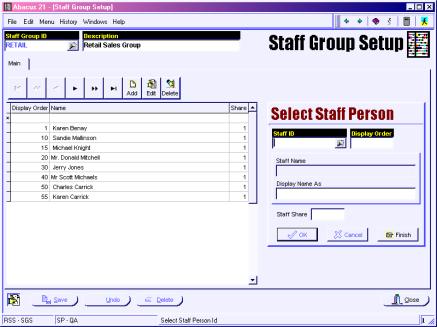
Staff Group Setup (RSS SGS and/or FSS SGS)
Staff Groups are used in two different ways:
There can be a Staff Group that is set up for assigning Sales People to Items in POS – and this ties into the setup that is placed in POS Configuration for Section Specific Sales Groups.
Staff Groups are also assigned in Staff Setup if different Commission rates are used for different Staff Groups – particularly those coming from the Spa to POS Interface.
Only the Staff Groups that are used in POS for attaching Sales People to Items need to have the Staff members attached.
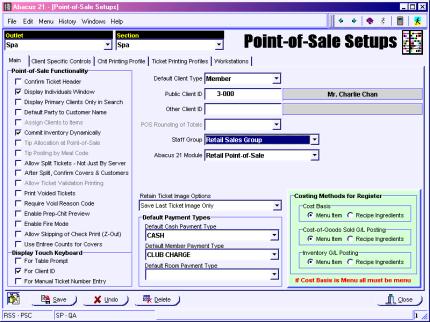
POS System Configuration (RSS PSC and/or FSS PSC)
The Staff Group assigned here will control the list of Sales People that appear when an Item is entered on a ticket.
A Staff Group is an Application-specific list of Staff personnel who are 'legible' to be selected at that Application Junction.
Staff Groups are assigned to individual Staff persons within Staff Setup Maintenance (within the Personal Tab):
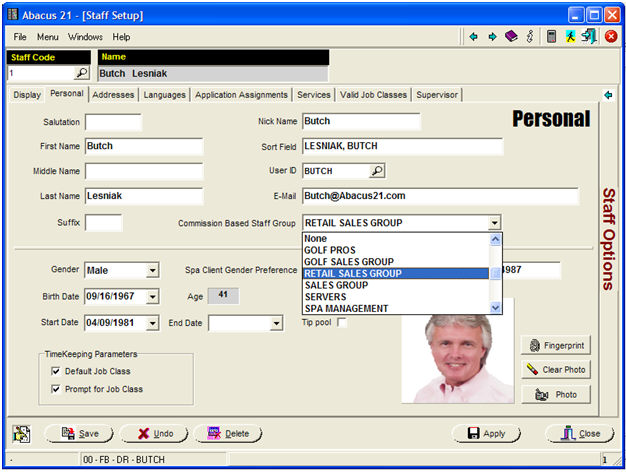
Sales People must belong to a particular Staff Group.