
This segment of the System allows the Administrator to activate specific User-defined Comment Types at specific Application Junctions.
Applications are defined by Abacus 21.
Application Examples:
|
|
|
Application Junctions (or Junctures) within Applications are defined by Abacus 21.
Application Junction Examples:
|
Application |
Junctures |
|
Membership-Client |
|
|
F&B Point-of-Sale |
|
|
Spa Module |
|
See also:


The following screen shows several Comment Types activated for the 'Client Maintenance' Juncture within the 'Membership-Clients' application:
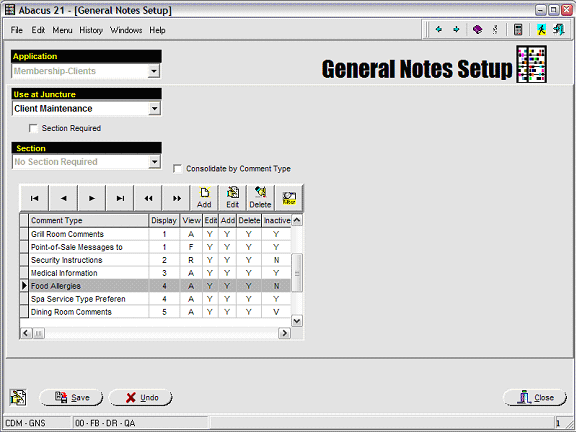
Notice in the above screen that there are several Types of Comments that have been 'activated' at this juncture.
Application - Select from a list of Abacus-defined Applications.
Use at Juncture - Select from a list of Abacus-defined Junctures (for that Application):
Note: some Applications are such that the General Comment Routine Setups can (or need to) be done 'per Section' -- in which case a Section Required fill-in must be done.
Section Required: Selected from the list of Section (previously created in conjunction with the Abacus 21 System).
Consolidate by Comment Type: Check if the Comments are to be consolidated by Comment Type -- since multiple Comments may be created/attached to a particular Comment Type.
The screen below illustrates how to activate a particular Comment Type at an Application-Juncture:
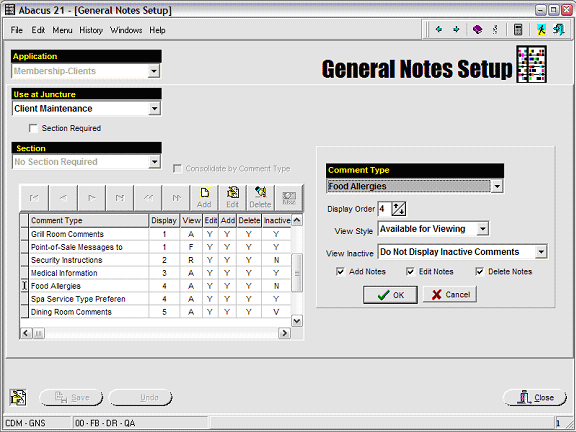
Comment Type: Select the Comment Type to be 'activated' at this Application-Junction.
Display Order: Enter a sequence number that will 'arrange' the display order of the Comment Types when 'presented' to the Operator at this Application-Juncture.
Ties in Display Order will be broken alphabetically.
View Style: Select the desired viewing style of this Comment Type at this particular Application-Juncture.
Available for Viewing (at the Operator's discretion)
Not Available for Viewing
Force Viewing (immediately presents the Comment -- whether the Operator desires it or not)
Required for Viewing (force-presents the Comment -- if the Operator has not discretionary viewed them)
View Inactive Comments: Select the functionality desired with respect to Viewing comments that have been deleted (in-activated):
Do Not Display Inactive Comments (ie, do not show Inactive Comments)
Always Display Inactive Comments (ie, show Inactive Comments along with Active Comments)
Display Inactive Selected by Button Push (ie, do not naturally show Inactive Comments -- but give the Operator a Button to push to optionally view the Inactive Comments).
Add Notes: Check this Box if the Operator will be allowed to 'create' new Comments of this Comment Type at this Application-Juncture.
Edit Notes: Check this Box if the Operator will be allowed to 'edit' Comments of this Comment Type at this Application-Juncture.
Delete Notes: Check this Box if the Operator will be allowed to 'delete' Comments of this Comment Type at this Application-Juncture.