

The Abacus 21 System has a number of Human Resource related applications that can be integrated or interfaced.
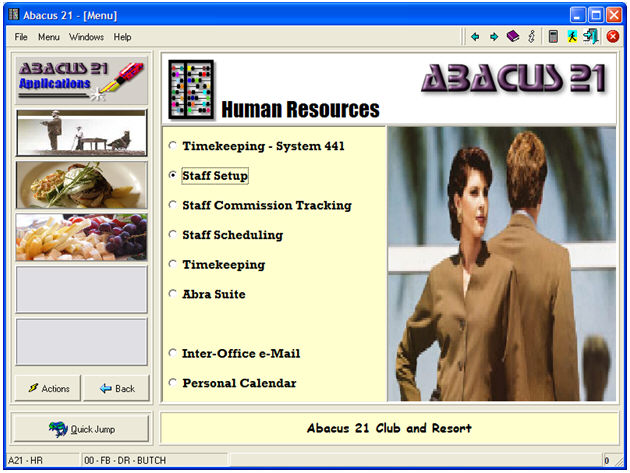
Primary amongst these are:
Staff Setup (defining the Employees)
Staff Commissions Tracking (the sophisticated version of Commissions)
Staff Scheduling
Staff Timekeeping (that can work in tandem to Scheduling)
Abra™ Suite (Interfaces with Sage-Best Human Resources, Applicant, Training, Payroll Packages)
Inter-Office Email (and Broadcasting)
Personal Calendars
Abacus 21 has a number of other Human Resource & Payroll System Interfaces.
Note: Staff can also be maintained off of the Point-of-Sale Setups Menu:

User-ID's and Staff-ID's and Staff-Passwords and Staff-Privileges -
Within Abacus 21's System-441, there are three principal levels of identifying "who you are" with respect to the System's operation:
Staff-Passwords (which is a subset of Staff-ID's)
This section (after a brief distinguishing introduction) concentrates on Staff-ID and Staff-Passwords -- which is a more Application-specific concept than the higher-level, System-oriented User-ID's.
For more information regarding User-ID's, see User Log-In.
User-ID -
User-ID is the more-general (and initial) means of identifying an Operator of the System. For the person signing into Abacus 21's System, it determines the Operator's:
Opening Application Menu
List of their entitled-to-select Profiles
Menu-Option Security Access
Direct-Run capabilities
Note that this 'User-ID' is strictly Abacus 21 related. It assumes the User had already signed into the Network with an appropriate Network User-ID defined apriori to Abacus 21 by the Computer System's Network Administrator.
It is the User-ID that is 'recorded' to System File-Table create-edit-delete Transactional Audit Trails.
User-ID can be set 'behind the scenes' to link to a Staff-ID... so that signing in with a particular User-ID implies an associated Staff-ID.
User-ID's may be individually associated with a particular person... or more generically associated with a type-group of people:
Anne is the Accounts Payable Entry Clerk. She has her own individual User-ID... which, when used, for instance:
Identifies her as a Sign-In User of the System.
Restricts her to Accounting-only Profiles -- perhaps only of Company-A as opposed to those of Company-B.
Leads her directly to the main Accounts Payable System Application Menu.
Allows her to run all Options on the Accounts Payable Menu -- with, for example, the Option to 'Print Checks'.
Anne may have an implied Staff-ID which is not prompted for when she signs into (for instance -- because there are only two-three people at the Client site who would ever be attempting to use the A/P-Module) A/P-Check-Register... but is 'implied'... and allows her the privilege of 'posting' A/R Registers.
As a contrasting example, there may be a need to establish a generic User-ID.
Presume there are approximately 30 Employees who function as Food/Beverage Servers... and these Employees shuffle amongst the Main Dining Room, the Grille, Lounge Bar, and the SnackBar. This scenario may have induced the Administrator to set up one User-ID (called 'DR-POS' for the Dining Room Point-of-Sale general access) -- that all Servers would use when they 'turned on' the System in the Dining Room. This generic (to the Dining Room) User-ID would:
Identify (albeit non-specifically) the Sign-In User to the System [not the primary purpose in this context].
Restrict the Profile to include only the Dining Room Outlet-Section (so that they could access the Grille or Lounge, or SnackBar operations.
Leads automatically into launch F/B Point-of-Sale (by-passing all of the other higher-order Application Menus).
Readies POS to prompt for Staff-Password (see below).
For more information regarding User-ID's, see User Log-In.
Staff-ID -
Staff-ID is equivalent to an Employee-ID -- and is typically associated with a specific individual Employees.
Note that Staff-ID is not required to be equal-to the Employee's 'Employee-No.' (from a Payroll perspective)... as the Employee-No is retained as a separate field within Abacus 21's Staff record.
In subsequent discussion, Staff and Employee should be considered the same... unless specifically distinguished.
Unless the Abacus 21 System is handling the Human Resources, Payroll, or Timekeeping aspects of a Business's operation, it is not absolutely necessary to load all Employees into Abacus 21 as 'Staff'... rather, only those pertinent to the applicational-operations being handled by the Abacus application modules.
Associated with the Staff-ID are all the demographics pertinent to the Employee -- and, of particular importance, the Employee's Applicational Staff-Password(s).
Important Privilege Considerations:
It is the Staff-Passwords that -- within the particular respective Abacus Applications -- recognize the Staff person as a legitimate user of that Application... and determine (via the associated Staff Type) that person's specific "privileges" to perform specific functions within that particular Application.
Specific 'functions' that might be "privileged" within an Application could include (for example):
Privilege to do a Price Change (Markdown or Comp)
Privilege to Void a 'fired' Item
Privilege to change a Customer Discount
Privilege to Void a Ticket
Privilege to Open a 'Closed' Ticket
Privilege to Open another Server's or Clerk's POS Ticket
Privilege to change a requested Therapist on a Spa Appointment
Etc.
Within the context of setting up a Staff Person -- and associated them with one or more Applicational areas -- a particular Employee (Staff ID -- Staff Person) can be set up to have (for and within any specific Application):
No Staff-Passwords (they are merely identified within the System as Staff personnel -- even perhaps having Service-providing "Qualifications") -- but have no access rights to actually "using" the System.
A Single Staff-Password -- giving them access to one particular Application only -- with a particular set of Privileges that are assigned to the Staff-Type associated with that Password (for that Application)
Multiple Staff-Passwords -- used for when the individual is often rotating between Manager vs. Server (for instance) jobs.
A single Staff person may have multiple Staff Application Passwords (as they are set up to be able to 'operate' several different Applications -- perhaps with different Privilege levels in each: for example, a 'Manager' within the Dining Room... but a normal 'Clerk' in the Golf ProShop.
See the above Privilege Considerations.
So, in summary, when a Menu Option (that is Program or Application) is selected, the following Authorization Hierarchy is checked:
Does the User-ID have the authorization to run the Program? (And, if so, in Full-Access Mode or Inquiry-Only Mode?)
Is a Staff-Password required to run the Program?
At specific 'function' junctions within the Program, does the Staff-Password (through its associated Staff-Type) have the "privilege" to do that particular 'function'?
This section describes how to create Staff people within Abacus 21's System 441.
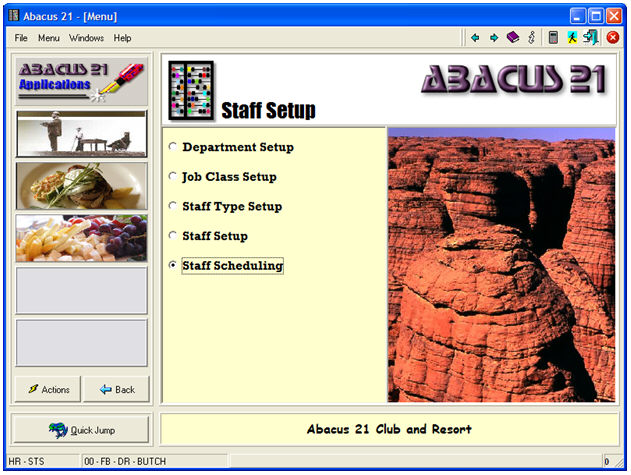
Associated with Staff Setup are for principal programs:
Staff Scheduling will be discussed in another section.
